

Business leaders waste up to 40% of their workweek on repetitive manual tasks that AI could handle in seconds. While competitors automate workflows and scale operations, organizations stuck in manual processes watch productivity and customer satisfaction decline. AI-driven workflow optimization transforms this reality by identifying high-impact automation opportunities, implementing intelligent agents, and measuring tangible efficiency gains. This guide delivers practical strategies for business leaders ready to implement AI workflows that boost operational efficiency and enhance customer engagement in 2026.
Table of Contents
- Understanding AI-Driven Workflow Optimization
- Preparing Your Business For AI Workflow Implementation
- Executing AI-Driven Workflow Optimization Step By Step
- Measuring And Verifying Impact For Sustained Success
- Explore AI Solutions To Optimize Workflows
- Frequently Asked Questions
Key takeaways
| Point | Details |
|---|---|
| Start with task identification | Identify repetitive tasks and automate using AI agents to focus on high-impact workflows first. |
| Measure empirical ROI | Businesses achieve 40-450 hours saved weekly and ROI up to 159% with properly implemented AI workflows. |
| Prioritize governance and oversight | Human-in-the-loop controls prevent AI failures in critical decision points and maintain quality standards. |
| Balance speed with quality | Focus on both efficiency gains and output quality to avoid diminishing returns from bloated workflows. |
Understanding AI-driven workflow optimization
AI-driven workflow optimization involves identifying repetitive tasks, implementing AI agents or automations, prioritizing use cases, and measuring KPIs like time saved and error rates. This approach transforms how businesses handle routine operations by replacing manual processes with intelligent systems that learn and adapt.
The core components include task analysis, automation selection, and performance monitoring. You start by mapping current workflows to spot bottlenecks and repetitive patterns. High-impact tasks typically involve data entry, document processing, customer inquiries, and report generation. These activities consume significant time but follow predictable patterns that AI handles efficiently.
Modern AI tools and frameworks make implementation accessible. Platforms like Jira integrate workflow automation directly into project management. LangChain enables custom AI agent development for complex multi-step processes. Agentic AI systems handle uncertain workflows by making autonomous decisions within defined parameters. Each tool serves different complexity levels and business needs.
Measuring success requires clear KPIs that track both efficiency and quality. Time saved per task provides immediate visibility into productivity gains. Error rates reveal whether AI maintains or improves accuracy compared to manual processes. Customer satisfaction scores indicate whether automation enhances or diminishes service quality. Processing speed shows how quickly workflows complete from start to finish.
Pro Tip: Focus on workflows that consume 20% of your team’s time but deliver 80% of measurable value. These high-leverage opportunities generate the strongest ROI and build momentum for broader AI adoption.
The ai-powered optimization explained framework helps you understand how different AI approaches fit specific business challenges. Some workflows benefit from simple rule-based automation, while others require sophisticated machine learning models that adapt to changing conditions.
Preparing your business for AI workflow implementation
Successful AI workflow implementation starts with thorough preparation. You need to assess current workflows systematically to identify automation opportunities that deliver measurable impact. Map each process step, noting time consumption, error frequency, and business value. This analysis reveals which workflows justify AI investment versus manual handling.

Prioritization separates successful implementations from failed experiments. Target projects with high impact and low complexity first. Customer service chatbots handling common inquiries fit this profile perfectly. Invoice processing automation saves hours weekly with minimal technical complexity. Email categorization and routing improves response times without requiring custom development.
Phased rollout minimizes risk while building organizational confidence. Start small with quick wins, using shadow mode where AI runs parallel to human processes without making final decisions. Move to assisted mode where AI suggests actions that humans approve. Finally, deploy supervised mode where AI acts autonomously with human oversight for exceptions.
Governance policies and human-in-the-loop controls protect quality and compliance. Establish clear rules for when AI can act independently versus when human review is mandatory. Financial approvals above certain thresholds, customer communications about sensitive topics, and decisions with legal implications all require human oversight. Document these boundaries explicitly before deployment.
Team training and change management determine adoption success. Explain how AI augments rather than replaces human capabilities. Show concrete examples of time saved and tasks eliminated. Address concerns about job security by highlighting how automation frees people for higher-value strategic work. Create feedback channels where team members report AI errors or suggest improvements.
Pro Tip: Run a 30-day pilot with one workflow and three team members before company-wide rollout. This controlled test reveals integration challenges and builds internal champions who advocate for broader adoption.
The ai strategy guide for SMEs provides frameworks for aligning AI investments with business objectives. Understanding the role of AI in operations helps you set realistic expectations for transformation timelines and resource requirements.
Executing AI-driven workflow optimization step by step
Implementation follows a structured approach that builds capability progressively. Each step addresses specific technical and organizational challenges while creating measurable value.
Step 1 focuses on identifying and automating repetitive tasks. Document every workflow that team members perform more than five times weekly. Calculate time spent per instance and annual frequency. Prioritize tasks with high volume, clear rules, and minimal exceptions. Data entry, appointment scheduling, and status updates typically top this list.
Step 2 involves choosing and integrating appropriate AI tools. Match tool capabilities to workflow complexity. Simple automations work through no-code platforms like Zapier or Make. Complex multi-step processes require frameworks like LangChain or custom agent development. Evaluate integration requirements with existing systems like CRM, ERP, and communication platforms.
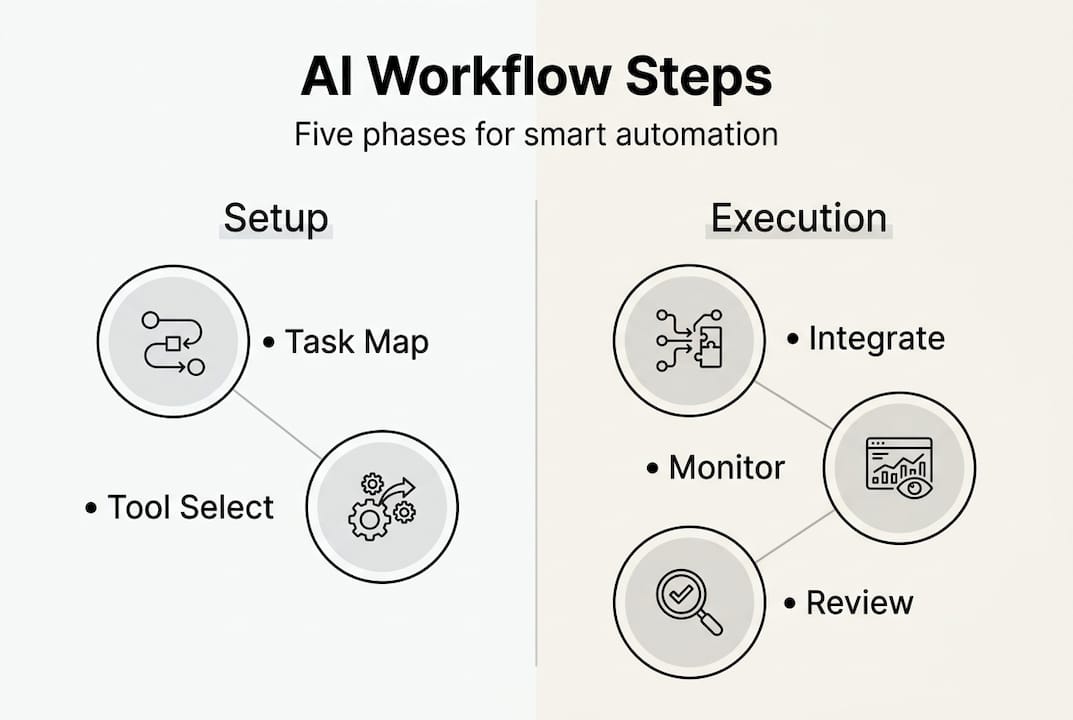
Step 3 implements reliability patterns that prevent AI failures. Agentic AI excels in multi-step uncertain workflows but requires robust patterns like loop controls, schema validation, and monitoring to avoid failures. Loop controls prevent infinite cycles when AI agents get stuck. Schema validation ensures outputs match expected formats before downstream systems consume them. Observability tools track every decision point for debugging and optimization.
Step 4 applies human-in-the-loop review for critical decisions. Configure workflows to pause at predefined checkpoints where human judgment adds value. Customer-facing communications, financial transactions, and policy exceptions all benefit from human oversight. Design review interfaces that present AI recommendations with supporting context, making approval or modification efficient.
Step 5 establishes continuous monitoring and iteration. Track performance metrics daily during initial deployment, then weekly as stability improves. Compare AI outputs against human baselines to verify quality maintenance. Collect user feedback systematically to identify edge cases and improvement opportunities. Update AI models quarterly with new training data reflecting business changes.
| Implementation Mode | AI Role | Human Role | Risk Level | Use Cases |
|---|---|---|---|---|
| Shadow | Observes and learns | Performs all tasks | Minimal | Initial testing, model training |
| Assisted | Suggests actions | Approves and executes | Low | Customer service, data analysis |
| Supervised | Acts autonomously | Reviews exceptions | Moderate | Invoice processing, scheduling |
| Autonomous | Full automation | Periodic audits | Higher | Routine notifications, backups |
Pro Tip: Build a rollback plan before deploying any AI workflow to production. Document manual procedures that team members can execute if AI systems fail, ensuring business continuity during technical issues.
Learn how to automate workflows business operations with detailed implementation guides. The process automation workflow implementation resource covers integration strategies for complex enterprise environments.
Measuring and verifying impact for sustained success
Quantifying AI workflow impact requires selecting metrics that capture both efficiency gains and quality maintenance. Key performance indicators fall into four categories: time savings, cost reduction, error rates, and customer satisfaction.
Time savings represent the most visible benefit. Track hours saved per workflow by comparing pre-AI and post-AI completion times. Multiply by task frequency to calculate weekly and annual savings. Empirical benchmarks show 40-450 hours saved weekly and ROI up to 159% with properly implemented agentic AI. These gains compound across multiple workflows as automation scales.
Cost reduction extends beyond labor hours. Factor in reduced error correction costs, faster customer response times preventing churn, and eliminated manual data entry expenses. Calculate total cost of ownership including AI tool subscriptions, integration development, and ongoing maintenance. Compare against fully loaded costs of manual processes including salaries, benefits, and overhead.
Error rates reveal whether AI maintains quality standards. Measure accuracy by comparing AI outputs against human review samples. Track error types to identify patterns requiring model retraining or workflow adjustments. Monitor false positive and false negative rates in decision-making workflows. Establish acceptable error thresholds based on business impact and regulatory requirements.
Customer satisfaction scores indicate whether automation enhances service quality. Survey customers about response speed, answer accuracy, and overall experience. Compare satisfaction before and after AI implementation. Watch for negative feedback about impersonal interactions or incorrect information that signals needed adjustments.
Data tracking tools and dashboards provide continuous visibility into performance. Configure real-time monitoring that alerts teams to anomalies like sudden error rate increases or processing delays. Build executive dashboards showing ROI trends, adoption rates, and efficiency gains across departments. Schedule monthly reviews where stakeholders analyze metrics and approve optimization initiatives.
| Metric Category | Key Indicators | Measurement Frequency | Target Improvement |
|---|---|---|---|
| Time Efficiency | Hours saved per task, workflow completion time | Daily | 40-60% reduction |
| Cost Reduction | Labor cost savings, error correction costs | Monthly | 30-50% decrease |
| Quality | Error rates, accuracy scores | Weekly | 95%+ accuracy |
| Customer Impact | Satisfaction scores, response times | Quarterly | 20%+ improvement |
Watch for diminishing returns as workflows mature. Initial implementations generate dramatic improvements, but subsequent optimizations yield smaller gains. Avoid bloating workflows with unnecessary AI steps that add complexity without proportional value. Focus optimization efforts where data shows clear opportunities rather than automating for automation’s sake.
Pro Tip: Create a monthly AI workflow scorecard that ranks implementations by ROI and identifies underperforming automations for redesign or retirement. This discipline prevents accumulation of low-value automations that consume resources without delivering results.
The business automation workflow efficiency guide provides benchmarking frameworks for comparing your results against industry standards and identifying improvement opportunities.
Explore AI solutions to optimize workflows
Implementing AI-driven workflow optimization requires strategic planning, technical expertise, and ongoing refinement. The frameworks and strategies outlined in this guide provide a foundation, but translating concepts into operational systems demands specialized knowledge. Professional guidance accelerates implementation while avoiding common pitfalls that derail AI initiatives.
Explore the AI strategy guide for SMEs for frameworks aligning AI investments with business objectives. Discover practical approaches to workflow automation solutions that deliver measurable efficiency gains. Learn how AI-powered optimization explained translates technical capabilities into business value across different operational contexts.
Frequently asked questions
What are the biggest challenges in AI workflow implementation?
AI reliability issues and the need for human oversight represent primary challenges. Unstructured data handling, governance bottlenecks, and integration complexity with legacy systems slow deployment. Organizations also struggle with change management as teams adapt to new AI-augmented processes.
How long does AI workflow optimization take to show ROI?
Most businesses see measurable ROI within 90 days of implementing their first AI workflows. Simple automations like email routing or data entry deliver immediate time savings. Complex multi-step workflows require 6-12 months for full optimization and ROI realization as teams refine processes and expand use cases.
What is human-in-the-loop and why does it matter?
Human-in-the-loop means AI systems pause at critical decision points for human review and approval before proceeding. This approach prevents costly errors in high-stakes workflows like financial approvals or customer communications. HITL balances automation efficiency with quality control and regulatory compliance requirements.
Can small businesses benefit from AI workflow optimization?
Small businesses often see proportionally larger gains because manual processes consume a higher percentage of total operations. Starting with focused automations in customer service, invoicing, or scheduling delivers immediate relief. Cloud-based AI tools eliminate large upfront investments, making sophisticated automation accessible at small business budgets.
How do you measure quality alongside speed improvements?
Track error rates, customer satisfaction scores, and output accuracy against human baselines. Compare AI-generated work samples to human-produced equivalents using blind review processes. Monitor customer feedback and complaint rates for signals that automation sacrifices quality. Balance speed metrics with quality indicators in performance dashboards to prevent optimization tunnel vision.
Recommended
- How to Implement AI Workflows for Education Success | Artificial Intelligence
- Implement Process Automation Workflow for Seamless Efficiency | Artificial Intelligence
- How to Automate Workflows for Efficient Business Operations | Artificial Intelligence
- AI Strategy Guide for SMEs: Boost Efficiency Step-by-Step | Artificial Intelligence
- AI in Sales: Promt Workflows That Save Hours Every Week – Sales Label IT Consulting
Recent Comments