

Small businesses constantly juggle limited resources while trying to stay competitive and meet customer expectations. Many owners face operational bottlenecks, repetitive tasks that drain time, and challenges in delivering personalized customer experiences at scale. AI integration offers a practical path to solve these problems, automating routine work and enhancing customer engagement without requiring massive budgets or technical expertise. This guide walks you through the complete AI integration process, from initial assessment to measuring real business outcomes, so you can transform operations and drive growth.
Table of Contents
- Understanding What You Need Before AI Integration
- Step-by-Step AI Integration Process For Small Businesses
- Common Mistakes To Avoid And Troubleshooting Tips
- Measuring Success And Expected Outcomes Of AI Integration
- Explore Practical AI Solutions To Empower Your Small Business
- Frequently Asked Questions
Key takeaways
| Point | Details |
|---|---|
| AI integration follows a structured process | Planning, tool selection, training, and measurement ensure successful adoption. |
| Preparation is critical for success | Clear goals and staff engagement prevent common pitfalls and maximize ROI. |
| Automation and engagement drive value | AI delivers measurable improvements in efficiency and customer satisfaction. |
| Continuous evaluation optimizes results | Regular monitoring and adjustment sustain long-term AI benefits. |
Understanding what you need before AI integration
Before you invest in any AI solution, you need a clear picture of where your business stands and what you want to achieve. Start by identifying operational inefficiencies that consume time and resources. Look at repetitive tasks like data entry, appointment scheduling, invoice processing, or customer inquiry responses. These are prime candidates for automation. Examine customer engagement gaps where personalization falls short or response times lag. Document these pain points with specific examples and quantify their impact on productivity and revenue.
Next, set clear, measurable goals aligned with your business vision. Clear definition of business objectives helps target AI adoption effectively. Instead of vague aims like “improve efficiency,” define specific targets such as “reduce invoice processing time by 40%” or “increase customer satisfaction scores by 25% within six months.” These concrete goals give you benchmarks to evaluate AI performance later.
Assess your current technology infrastructure and data readiness. AI tools need quality data to function effectively. Review your existing systems:
- Do you have centralized customer data or is information scattered across spreadsheets and platforms?
- Is your data clean, consistent, and accessible?
- Can your current software integrate with AI solutions or will you need middleware?
- Do you have reliable internet connectivity and sufficient computing resources?
Allocate budget and resources realistically. AI integration doesn’t require Fortune 500 budgets, but you need to account for software subscriptions, potential hardware upgrades, training time, and initial productivity dips during transition. Small businesses typically see positive ROI within 6 to 12 months when AI targets high-impact areas.
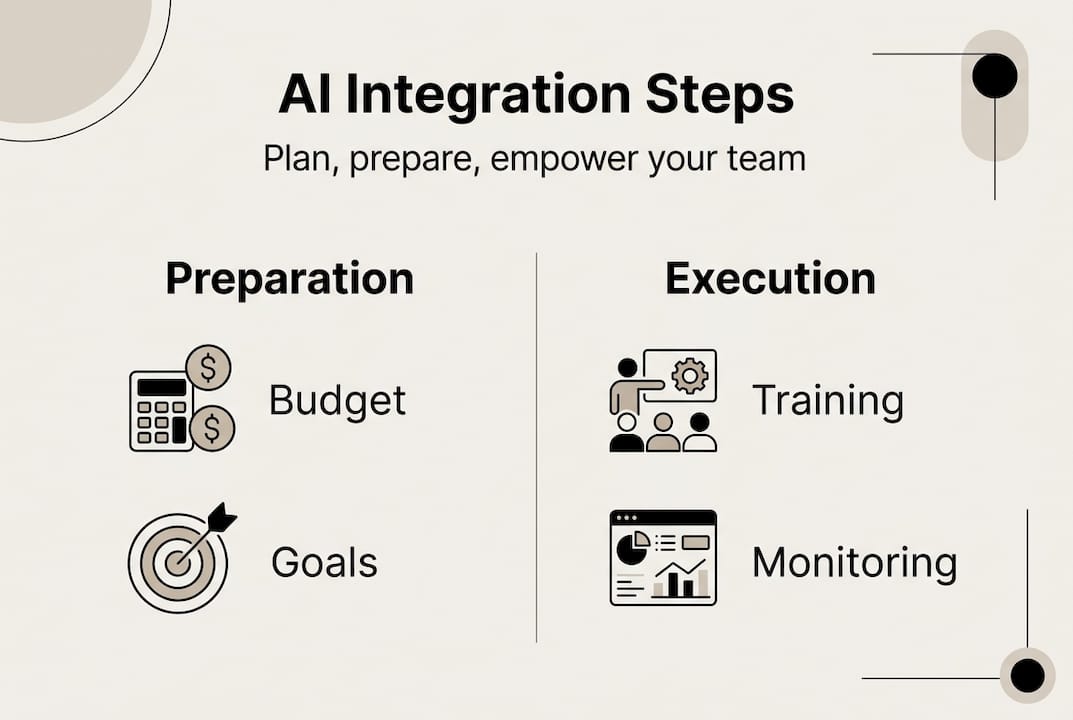
Engage key staff early and communicate expected benefits. Your team will use these tools daily, so their buy-in matters. Explain how AI will eliminate tedious tasks and free them for higher-value work. Address concerns about job security honestly. Most small business AI applications augment human capabilities rather than replace workers. Early communication builds trust and reduces resistance during implementation.
Pro Tip: Create a simple one-page AI readiness assessment documenting your pain points, goals, current tech stack, budget, and team sentiment. This becomes your roadmap and helps you evaluate vendor solutions against real needs.
Step-by-step AI integration process for small businesses
Once preparation is complete, follow a structured approach to implement AI effectively. This methodical process minimizes disruption and maximizes success rates.
-
Choose AI tools that match your specific business needs. Research solutions designed for small businesses in your industry. For customer service, consider AI chatbots that handle common inquiries. For operations, explore automation platforms that streamline invoicing, inventory management, or scheduling. For marketing, look at AI tools that personalize email campaigns or optimize ad spend. Implementing AI requires careful stepwise adoption and staff training. Prioritize tools with proven track records, transparent pricing, and strong customer support.
-
Integrate AI with existing workflows carefully to minimize disruption. Map out current processes step by step before introducing AI. Identify exactly where the AI tool will fit and what handoffs occur between human and automated tasks. Start with one workflow rather than attempting wholesale transformation. For example, if implementing an AI scheduling assistant, begin with one service type or one team member before expanding. This contained approach lets you troubleshoot issues without paralyzing operations.
-
Train your team on new AI tools and workflows for smooth adoption. Hands-on training works better than documentation alone. Schedule dedicated sessions where staff practice using the AI system with real scenarios. Create simple reference guides for common tasks. Designate AI champions within your team who can help colleagues and provide feedback. Training isn’t a one-time event. Plan for ongoing learning as you discover new features and optimize usage.
-
Pilot test AI solutions before full deployment to troubleshoot issues. Run the AI system alongside existing processes for a defined period, typically two to four weeks. Compare outputs, identify errors or gaps, and gather user feedback. This parallel operation provides a safety net and reveals integration challenges you didn’t anticipate. Use pilot results to refine configurations, adjust workflows, and build confidence before committing fully.
-
Continuously gather user feedback and monitor AI performance. Schedule weekly check-ins during the first month, then monthly reviews. Ask specific questions: What tasks are easier now? Where does the AI create confusion or extra work? What features do you wish it had? Track performance metrics like time saved, error rates, and customer satisfaction. Use this data to optimize settings and identify opportunities for expanding AI use.
Pro Tip: Document every step of your integration process with screenshots and notes. This documentation becomes invaluable when training new employees or expanding AI to other areas of your business.
Common mistakes to avoid and troubleshooting tips
Even well-planned AI integrations encounter obstacles. Recognizing common pitfalls helps you avoid costly setbacks and maintain momentum.

Avoid rushing AI adoption without clear objectives. Many small businesses face setbacks due to unclear goals and poor staff training during AI integration. The excitement around AI can push businesses to implement tools before defining what success looks like. This leads to misaligned solutions, wasted resources, and team frustration. Always tie AI adoption to specific, measurable business outcomes. If you can’t articulate exactly what problem the AI solves and how you’ll measure improvement, you’re not ready to implement.
Prevent inadequate staff training which reduces AI impact. Budget sufficient time for comprehensive training, not just a quick demo. Employees need to understand not just how to use the tool, but why it matters and how it fits into the bigger picture. Insufficient training creates workarounds where staff avoid the AI system and revert to old methods, negating your investment.
Beware of over-automating without human oversight. AI excels at pattern recognition and repetitive tasks but lacks judgment and emotional intelligence. Maintain human checkpoints for decisions involving customer relationships, quality control, or exceptions to standard processes. For instance, an AI system can draft customer service responses, but a human should review them before sending, especially for sensitive issues.
Have contingency plans for AI system failures:
- Maintain backup processes for critical operations
- Know how to quickly disable AI features if they malfunction
- Keep vendor support contacts readily available
- Document manual procedures so staff can pivot when needed
Monitor data privacy and compliance continuously. AI systems often process customer information, financial records, or proprietary business data. Ensure your AI vendor complies with relevant regulations and industry standards. Review data handling practices regularly. Implement access controls so only authorized personnel can view sensitive information. Update privacy policies to reflect AI usage and inform customers how their data is processed.
Pro Tip: Create a simple troubleshooting checklist for common AI issues. Include steps like checking internet connectivity, verifying data inputs, clearing cache, and restarting the system. This empowers your team to resolve minor problems quickly without waiting for external support.
Measuring success and expected outcomes of AI integration
Successful AI integration delivers measurable business improvements. Tracking the right metrics proves ROI and guides ongoing optimization.
Define KPIs aligned with AI goals before implementation. If your goal was reducing invoice processing time, track average time per invoice before and after AI adoption. If you aimed to improve customer satisfaction, monitor survey scores, response times, and resolution rates. Measuring AI impact helps optimize processes and realize efficiency gains. Common KPIs for small business AI include:
- Time saved on specific tasks (measured in hours per week)
- Cost reduction (labor costs, error correction costs, operational expenses)
- Revenue impact (increased sales, upsells, customer retention)
- Customer satisfaction scores (NPS, CSAT, review ratings)
- Error rates (data entry errors, missed appointments, billing mistakes)
Use data analytics tools to track performance continuously. Most AI platforms include built-in dashboards showing usage patterns and outcomes. Export this data regularly and combine it with your existing business metrics. Create simple visualizations that show trends over time. Share these insights with your team to maintain engagement and celebrate wins.
Compare operational metrics before and after AI adoption. Establish baseline measurements during your preparation phase. Track the same metrics at 30, 60, and 90 days post-implementation. This comparison reveals true impact and helps you separate AI benefits from other business changes.
| Metric | Before AI | After 90 Days | Improvement |
|---|---|---|---|
| Invoice processing time | 45 min/invoice | 12 min/invoice | 73% reduction |
| Customer response time | 4.5 hours | 15 minutes | 94% improvement |
| Monthly operational costs | $8,200 | $6,100 | 26% savings |
| Customer satisfaction score | 7.2/10 | 8.9/10 | 24% increase |
Expect improvements in automation, engagement, and cost savings over time. Initial results may be modest as your team learns the system and you refine configurations. Most small businesses see significant gains by month three. Automation benefits compound as you expand AI to additional workflows. Customer engagement improves as AI enables faster, more personalized interactions. Cost savings accumulate through reduced labor on repetitive tasks and fewer errors requiring correction.
Adjust AI strategies based on measurable results for continuous improvement. If certain features underperform, investigate whether the issue is configuration, training, or tool fit. If specific workflows show exceptional results, prioritize expanding AI there. Regular review sessions keep AI aligned with evolving business needs. As you grow, your AI requirements will change. What works for a five-person team may need adjustment at fifteen people.
Explore practical AI solutions to empower your small business
Now that you understand the complete AI integration process, you’re ready to explore specific solutions tailored for small businesses. Our AI strategy guide for SMEs provides detailed frameworks for planning and executing AI adoption across different business functions. Discover practical insights on how AI boosts efficiency and engagement with real-world examples from businesses like yours. For hands-on recommendations, explore our curated list of top AI automation platforms 2026 that deliver proven results for small business operations. These resources help you move from planning to action with confidence, backed by expert guidance and proven strategies.
Frequently asked questions
What is the first step in integrating AI for a small business?
The first step is assessing your business needs and defining clear, measurable goals for AI adoption. Identify specific operational inefficiencies or customer engagement gaps that AI can address. Document these pain points with concrete examples and quantify their impact. This foundation ensures you choose AI solutions that solve real problems rather than implementing technology for its own sake. Our AI strategy guide for SMEs walks through this assessment process in detail.
How do I choose the right AI tools for my small business?
Choose tools aligned with your defined goals, budget, and current technology setup. Research solutions designed specifically for small businesses in your industry, as these typically offer better pricing and simpler implementation than enterprise platforms. Evaluate how smoothly each option integrates with your existing workflows and software. Prioritize vendors with transparent pricing, proven track records, and responsive customer support. Start with one focused application rather than comprehensive suites to minimize complexity and cost.
What are common mistakes when integrating AI in small businesses?
Rushing adoption without clear objectives and inadequate staff training are the most common mistakes. Many small businesses face setbacks due to unclear goals and poor staff training during AI integration. Over-automation without human oversight creates quality issues and customer dissatisfaction. Ignoring data privacy and compliance exposes you to legal and reputational risks. Avoid these pitfalls by following a structured implementation process, investing in comprehensive training, maintaining human checkpoints for critical decisions, and regularly reviewing data handling practices.
How can I measure the success of AI integration in my business?
Set clear KPIs related to efficiency and engagement before implementation, such as time saved per task, cost reduction, customer satisfaction scores, or error rates. Use data analytics tools to monitor these metrics continuously and compare before and after performance. Track measurements at 30, 60, and 90 days post-implementation to verify benefits and identify areas for optimization. Regular comparison of operational metrics proves ROI and guides ongoing improvements. Learn more about the role of AI in operations and effective measurement strategies.
Recommended
- How AI boosts efficiency and engagement in small business | Artificial Intelligence
- AI Strategy Guide for SMEs: Boost Efficiency Step-by-Step | Artificial Intelligence
- 6 Key Advantages of AI for SMEs and How to Use Them | Artificial Intelligence
- Role of AI in Operations – Transforming Efficiency for SMEs | Artificial Intelligence
- Why Integrate AI: 18% Growth Boosts Mid-Sized Efficiency | NULLBIT
Recent Comments