

Keeping up with rapid advances in artificial intelligence can feel overwhelming for educational institutions aiming to improve student engagement and day-to-day operations. For AI implementation managers in North American schools, a clear path starts with a focused assessment of what your organization needs and how prepared you really are to benefit from tailored AI workflows. This guide lays out practical steps for building real institutional capacity, emphasizing systematic readiness and ethical alignment to set your AI initiatives up for measurable success.
Table of Contents
- Step 1: Assess Organizational Needs And Technical Readiness
- Step 2: Define Impactful AI Workflow Objectives
- Step 3: Select And Configure Appropriate AI Tools
- Step 4: Integrate AI Workflows With Existing Systems
- Step 5: Test, Validate, And Optimize Workflow Effectiveness
Quick Summary
| Key Point | Explanation |
|---|---|
| 1. Assess Technical Readiness | Evaluate your existing systems’ capability to support AI tools. |
| 2. Define Clear AI Objectives | Set specific, measurable goals aligned with your educational mission. |
| 3. Choose Appropriate AI Tools | Select tools that directly address your defined objectives. |
| 4. Ensure Seamless Integration | Integrate AI workflows with existing systems for smooth operation. |
| 5. Continuously Test and Optimize | Regularly evaluate your AI workflows to ensure effectiveness and adjust as needed. |
Step 1: Assess organizational needs and technical readiness
Before you implement AI workflows, you need to understand where your institution stands right now. This step involves taking an honest look at your current capabilities, infrastructure, and staff readiness. Think of it as a health checkup for your organization. You’re not just looking for problems; you’re identifying strengths you can build on and gaps you need to address. The goal here is to create a realistic baseline that will guide your entire AI implementation journey.
Start by evaluating your technical infrastructure first, since it forms the foundation for everything else. Ask yourself what systems you already have in place. Do your learning management systems, student information platforms, and data management tools have the capacity to support AI tools? Can your network bandwidth handle increased data processing? What about your data quality and accessibility? These practical questions matter because AI workflows only work when they have clean, accessible data to learn from. Next, assess your human capital. This includes not just your IT department, but teachers, administrators, and support staff across the institution. What’s the current level of AI literacy among different groups? The AI Readiness Framework emphasizes evaluating capacity across educators, students, and school districts systematically, measuring technical skills and identifying training gaps. You’ll want to know who understands AI concepts already and who would benefit from foundational training. Don’t overlook your leadership team; their understanding of AI’s potential directly impacts how quickly and effectively you can move forward.
Your governance structure and organizational readiness also deserve attention. Consider your current policies around data privacy, student information protection, and technology adoption. Do you have clear processes for evaluating new tools? According to the OECD framework for building an AI-ready workforce, institutions must conduct proactive governance to align AI adoption with organizational goals, ethical standards, and operational processes. This means establishing who makes decisions about AI tools, how you’ll handle ethical concerns, and what success looks like for your institution. Create a simple assessment document that captures these three areas: technical infrastructure readiness, staff capabilities and training needs, and governance frameworks. Involve key stakeholders from different departments in this assessment so you get a complete picture and build buy-in across your institution.
Pro tip: Document your assessment findings in a shared format that you can reference throughout your implementation; this becomes your roadmap for prioritizing investments in infrastructure upgrades, staff training, and governance policies.
Here’s a summary of core areas to assess when preparing for AI implementation:
| Area of Assessment | Key Focus | Common Challenges | Opportunity for Improvement |
|---|---|---|---|
| Technical Infrastructure | System capability, data quality | Legacy systems, poor data access | Upgrade hardware, standardize data |
| Staff Readiness | AI literacy, training gaps | Uneven knowledge, resistance | Targeted training, workshops |
| Governance & Policy | Data privacy, decision process | Weak oversight, unclear roles | Clear frameworks, ethical policies |
Step 2: Define impactful AI workflow objectives
Now that you understand where your institution stands, it’s time to get specific about what you want AI to accomplish. Your objectives need to be clear, measurable, and directly tied to your educational mission. Without defined objectives, AI implementation becomes a technology exercise rather than a strategic move that actually improves learning outcomes and operational efficiency.

Start by connecting your AI objectives to your institutional goals. What are you trying to improve? Are you looking to personalize learning experiences for struggling students, reduce administrative burden on faculty, increase student engagement, or improve data informed decision making across departments? Your objectives should address real pain points your institution faces right now. When defining these objectives, consider the broader educational landscape. Effective AI workflow objectives should incorporate ethical awareness and human centered design principles, preparing both your students and staff to work responsibly with AI systems. This means your objectives shouldn’t just focus on efficiency gains; they should also address how your community will develop critical thinking skills around AI use and ensure that AI serves your educational values. Think about what success looks like for different groups at your institution. For students, objectives might focus on personalized learning pathways or improved feedback mechanisms. For educators, objectives could center on automated grading support or data insights that help identify student struggles earlier. For administrators, objectives may involve streamlined enrollment processes or predictive analytics for resource allocation.
Be specific about the problems you’re solving. Instead of saying “improve student engagement,” define it as “increase discussion forum participation among disengaged students by 40% within one semester” or “reduce time faculty spend on routine grading by 8 hours per week.” Your AI workflows should reflect agentic paradigms like planning and reflection that support adaptable, trustworthy processes aligned with your pedagogical needs. Once you’ve drafted your objectives, test them against three criteria. First, are they achievable with the resources and technology you identified in your readiness assessment? Second, do they have measurable outcomes you can track over time? Third, does your community understand why these objectives matter and how they connect to the institution’s broader mission? Involve your stakeholders in refining these objectives so everyone feels ownership over the goals.
Pro tip: Create a simple one-page objective summary that lists your top three to five AI workflow goals with their measurable outcomes and timelines; share this widely across your institution so staff and students understand exactly what you’re building toward.
The following table compares major AI workflow objectives across stakeholder groups:
| Stakeholder | Primary Objective | Success Metric | Example AI Use Case |
|---|---|---|---|
| Students | Personalized learning paths | Improved grades, engagement rate | Adaptive tutoring, tailored feedback |
| Educators | Reduce administrative load | Hours saved, faster interventions | Automated grading, data analytics |
| Administrators | Increase operational efficiency | Faster enrollments, resource usage | Predictive scheduling, process automation |
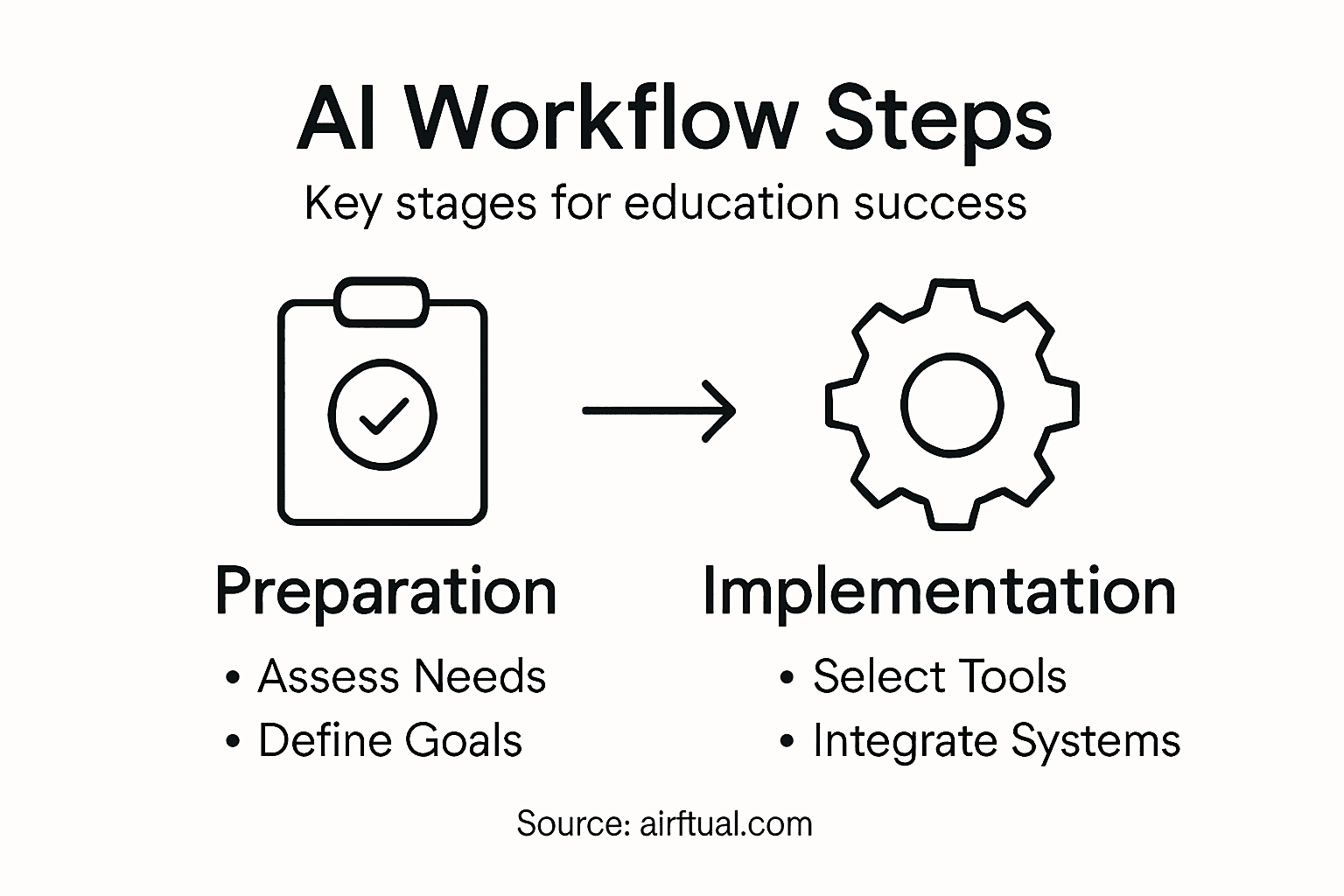
Step 3: Select and configure appropriate AI tools
With your objectives clearly defined, you’re ready to find the right AI tools that will actually deliver on those goals. Selecting and configuring AI tools is not about chasing the latest technology. It’s about matching specific tools to your institution’s needs, your technical infrastructure, and your educational values. The wrong tool, no matter how advanced, will waste time and resources. The right tool becomes an extension of your teaching and administrative processes.
Start by matching tools to your specific objectives. If one of your goals is to personalize learning experiences for struggling students, you need tools designed for adaptive assessment and individualized pathways rather than general purpose AI chatbots. If you’re focused on reducing grading burden for faculty, look for tools specifically built for educational assessment. Selecting tools that align with pedagogical goals and data privacy standards ensures you’re not compromising your institution’s values for convenience. Consider practical factors during your selection process. Does the tool have strong data security features, especially since you’re handling student information? Is it user-friendly enough that your faculty and staff won’t need extensive technical training to use it effectively? Can it integrate with your existing learning management systems and student information platforms that you assessed earlier? Request trial periods or demos whenever possible. Have your teachers actually use the tool in a realistic classroom scenario. Have your administrators work through a typical workflow. Real-world testing reveals problems that marketing materials hide.
Once you’ve selected your tools, configuration is where implementation becomes concrete. Configuration means adapting the tool to your specific curriculum, setting appropriate parameters for how AI makes decisions, and establishing guidelines for ethical use. This is the step where your governance framework from step one becomes actionable. Who has access to what features? How will data be stored and protected? What happens if the AI tool makes a decision that affects a student’s grade or progress? Configuring tools for ethical deployment involves training teachers and students on appropriate usage and establishing monitoring systems to track whether the tool is actually delivering the benefits you expected. Set up clear success metrics aligned with your original objectives. If your goal was to reduce grading time by eight hours weekly, measure actual hours saved after the first month. If you wanted to improve engagement, track participation metrics. Configuration isn’t a one-time event. It’s an ongoing process where you gather feedback from users, analyze impact data, and adjust settings to optimize performance.
Pro tip: Create a simple configuration checklist for each tool covering data security settings, user access levels, integration with your existing systems, and success metrics to track; review this checklist with your IT team and instructional designers before full rollout.
Step 4: Integrate AI workflows with existing systems
Now comes the critical phase where your AI tools meet your actual institution. Integration is where planning becomes operational reality. Your new AI workflows need to work seamlessly with the learning management systems, student information platforms, gradebooks, and administrative tools your staff already uses daily. Poor integration creates friction, frustration, and ultimately failed implementation. Strong integration means your AI workflows become invisible to users because they fit naturally into existing processes.
Start with your technical infrastructure. Review the compatibility assessment you conducted in step one. Your AI tools need to exchange data smoothly with your existing systems without manual workarounds or duplicate data entry. If your institution uses Canvas or Blackboard as your learning management platform, verify that your selected AI tool can pull student data, submit grades, and trigger notifications through standard integration methods like APIs or built-in connectors. Work closely with your IT team to map out exact data flows. Which systems will send data to your AI tools? Which will receive results? How often will data sync? What happens if a sync fails? Successful integration requires technological compatibility with existing systems and proactive leadership to ensure alignment with your institutional goals. This isn’t a technical detail to delegate completely to IT. You and your educational leadership need to understand the integration architecture so you can make informed decisions about what’s possible and what trade-offs exist.
Beyond the technical side, integration also means embedding AI workflows into your actual processes and policies. If you’re using AI for grading support, how does that integrate with your grade appeal process? If AI is recommending which struggling students need intervention, who reviews those recommendations and how do they act on them? Integrating AI involves aligning AI deployment with course policies, data security standards, and academic integrity guidelines while supporting educators in ethical use. Your governance framework becomes actionable here. Update your institutional policies to address how AI will be used, what safeguards protect student data, and how faculty and students access these new workflows. Plan your rollout carefully. Rather than activating AI across all courses and departments simultaneously, consider a phased approach. Start with one department or course cohort. Gather feedback, troubleshoot problems, and document what works before expanding. This staged integration reduces risk, builds confidence among users, and allows your support team to develop expertise organically. Assign clear ownership. Who owns the relationship with the vendor? Who troubleshoots integration problems? Who trains faculty? Who monitors whether the AI is actually improving outcomes? Without clear accountability, integration stalls when problems emerge.
Pro tip: Create a detailed integration runbook documenting data flows, system connections, troubleshooting procedures, and escalation contacts; share this with relevant staff and update it as you learn what works in your actual environment.
Step 5: Test, validate, and optimize workflow effectiveness
You’ve selected your tools, integrated them into your systems, and launched your AI workflows. Now comes the phase that separates successful implementations from disappointing ones. Testing and validation aren’t one-time events that happen before launch. They’re ongoing processes that reveal whether your AI workflows are actually delivering the benefits you expected. Without rigorous validation, you’re flying blind, unable to distinguish between genuine improvements and wishful thinking.
Start your testing with controlled conditions before going institution-wide. Run your AI workflows with a small group of actual users in realistic scenarios. If you’re using AI for grading, have volunteer instructors grade assignments with the AI assistance active and measure the impact on their time and consistency. If you’re implementing AI-powered tutoring recommendations, track which students receive them, whether they engage with the recommendations, and whether those students show improved performance. Document everything. What worked? What confused users? Where did the AI make mistakes? Rigorous evaluation of AI tools involves designing reproducible experiments, controlled testing, and interpreting performance metrics to validate workflow components systematically. This means establishing clear baseline metrics before implementation. If your goal was to reduce grading time, measure how long grading takes now. If you wanted to improve engagement, establish current participation levels. These baselines let you measure actual change rather than guessing whether improvement occurred.
As you gather data from your testing phase, look for bias and unintended consequences. Does your AI recommendation system suggest interventions more often for certain demographic groups? Are some courses benefiting from AI while others see no change? Testing and validation of AI systems requires assessment of accuracy, robustness, bias, interpretability, and transparency to ensure trustworthiness and ethical compliance. If you discover bias or problems, that’s not a failure. That’s exactly what testing is designed to surface. Use these findings to adjust your AI workflows. Maybe you need to retrain the model on different data. Maybe you need to add human review for certain high-stakes decisions. Maybe you need to limit the AI’s scope to lower-risk applications. After your testing period, analyze your metrics against your original objectives. Did you reduce grading time by eight hours weekly or only four? Did engagement improve for the students who struggled most? Did administrative tasks become simpler or more complicated? Share these results transparently with your stakeholders. Not all results will be positive. Some workflows will underperform. That transparency builds credibility and helps you prioritize where to invest optimization efforts next. Optimization is iterative. You’ll adjust settings, gather more data, and adjust again. Plan to revisit your validation metrics quarterly. What’s working beautifully in September might need tweaking by January when student behavior patterns shift. What seemed like a minor problem in early testing might become critical at scale.
Pro tip: Create a simple dashboard tracking your key success metrics and share it monthly with your implementation team; this ongoing visibility makes problems visible early and celebrates genuine wins that keep momentum strong.
Unlock the Full Potential of AI in Your Educational Institution
Implementing AI workflows for education success comes with complex challenges like assessing organizational readiness, defining clear objectives, selecting the right tools, and ensuring seamless integration. If you are facing hurdles in aligning AI solutions with your institution’s unique needs or struggling to turn powerful AI concepts like agentic paradigms and ethical governance into actionable results, you are not alone. Many educational leaders feel overwhelmed managing technical infrastructure, staff training, and data privacy while striving to enhance learning outcomes and operational efficiency.
At airitual.com, we specialize in helping schools and educational organizations navigate these exact challenges. Our tailored AI-powered tools and strategic consulting focus on practical implementation that respects your institution’s values and existing systems. We partner closely with your team to assess your readiness, define measurable AI objectives, and configure systems that integrate naturally into your workflows. Whether you want to reduce grading time, personalize student learning, or improve administrative processes, our solutions turn AI from a distant ideal into meaningful educational transformation.
Ready to move beyond theory to measurable AI impact in education? Discover how our customized strategies and tools at airitual.com can help you confidently implement and optimize AI workflows. Take the first step today by scheduling a free strategy session at airitual.com and empower your institution to lead the future of learning.
Frequently Asked Questions
How can I assess my institution’s readiness for implementing AI workflows?
Assess your institution’s readiness by examining your existing technical infrastructure, evaluating staff capabilities, and reviewing governance frameworks. Begin by creating a simple assessment document capturing these areas to identify strengths and gaps that will guide your AI implementation journey.
What should I consider when defining objectives for AI workflows in education?
When defining objectives, ensure they are clear, measurable, and tied to your educational mission. Focus on specific pain points, such as increasing student engagement by 40% or reducing faculty grading time by 8 hours per week, to create actionable goals that reflect real needs.
How do I select the right AI tools for my educational institution?
Select AI tools by matching them to the specific objectives you have defined. Ensure that the tools align with your educational values and have the necessary security features, user-friendliness, and compatibility with your existing systems to make implementation smooth.
What steps should I take to integrate AI workflows with existing systems?
Integrate AI workflows by ensuring compatibility with your current technical infrastructure and mapping out data flows between systems. Plan your integration carefully, considering a phased approach to troubleshoot issues and gather feedback from users gradually.
How can I test and validate the effectiveness of AI workflows?
Test AI workflows by running controlled conditions with a small group of users to measure their impact on tasks, like grading time or student engagement. Document findings, adjust workflows based on user feedback, and regularly revisit your performance metrics to ensure continuous improvement.
What should I do if my AI workflows underperform or show bias?
If your AI workflows underperform or exhibit bias, analyze the data to identify the source of issues. Make necessary adjustments from algorithm retraining to adding human oversight, and clearly communicate these findings with stakeholders to foster transparency and trust.
Recent Comments